Categories
lawlibrary Legal Technology

Legal Research in the Blogosphere – VerdictSearch

Legal research can be challenging, even for experienced attorneys; however, there are many resources available to assist both attorneys and non-attorneys with their legal research needs.  The Legal Research in the Blogosphere series will share blog posts and online sites that legal researchers may find useful.

Last week, we featured a post on VerdictSearch, an online database available at the Law Library for patrons to use, free of charge.  (You can read it here.)  If you are interested in a more detailed review of VerdictSearch, specifically its functionality and features, check out the review available on the Law Sites Blog at http://www.lawsitesblog.com/2012/11/verdictsearch-ramps-up-its-look-and-functionality.html.  If you have questions about how to use VerdictSearch, the Law Library is always available to help!

Categories
lawlibrary Legal Technology

Online Databases in the Limelight – VerdictSearch

Blog PhotoOnline databases can be invaluable, time-saving  tools to any legal researcher as they provide organized access to a wide array of legal resources as well as sophisticated search tools.  Many online databases, including fee-based databases, are available at the Law Library, free of charge, to library patrons.  Each Tuesday of this month, this blog will highlight one of the many databases available at the Law Library.

Are you looking for case valuation assistance?  Then look no further because the Law Library subscribes to VerdictSearch, an online database that assists with verdict and settlement research.  VerdictSearch at the Law Library provides users with access to federal and state cases from Maryland, Virginia and Washington D.C.  Users can search by specific terms as well as by type of injury (e.g., arm, brain, cancer), award (e.g., decision in favor of defendant, settlement, mediated settlement) and case (e.g., appeals, business law, civil practice).  Users can further refine their searches by plaintiff type (e.g., age, gender) and date range.  These searches may assist you with your trial research and strategy development.  VerdictSearch’s document delivery includes printing and email (PDF and Word).

Law Library patrons may use VerdictSearch in the library’s computer room free of charge.  If you have any questions regarding how to use VerdictSearch, please come to the Law Library’s service desk.

For more information about understanding legal research, including the difference between primary and secondary legal resources, check out these research guides.

*Note that VerdictSearch does offer a national database as well as practice area-specific databases.  The Library subscribes only to the Maryland, Virginia and Washington D.C. databases as these jurisdictions are the most relevant for the Law Library’s patrons.

Categories
lawlibrary Legal Technology

Online Databases in the Limelight – HeinOnline

Computer Room Photo
Access to HeinOnline is available in our computer room.

Online databases can be invaluable, time-saving  tools to any legal researcher as they provide organized access to a wide array of legal resources as well as sophisticated search tools.  Many online databases, including fee-based databases, are available at the Law Library, free of charge, to library patrons.  Each Tuesday of this month, this blog will highlight one of the many databases available at the Law Library.

Last week, this blog published a post about the Westlaw and Lexis databases available at the Law Library. This week, we would like to introduce you to another great database, HeinOnline. HeinOnline is the largest, image-based legal research database with full-text and page images of law review articles, treatises and primary sources of law. HeinOnline users can search for specific resources or browse one of the database’s many collections. For example, you can browse the Law Journal Library collection and see a listing of a specific Law Review’s articles, organized chronologically. Library patrons can access HeinOnline in the library’s computer room.

There is overlap between the resources available on HeinOnline and the resources available on the Westlaw and Lexis. However, there are two big reasons why users may prefer to use HeinOnline over Westlaw and Lexis. First, HeinOnline is an image-based database. This means that users can see page images of documents, including graphics, which match the print versions of the resources. Second, HeinOnline has a greater focus on retrospective historical coverage, meaning that users will be able to find older documents that may be unavailable in the other databases. For example, are you interested in railroad case law from the 1800s?  You can find many cases in HeinOnline’s Early American Case Law collection.

For more information about understanding legal research, including the difference between primary and secondary legal resources, check out these research guides.

Categories
lawlibrary Legal Technology

Online Databases in the Limelight – Westlaw & Lexis

photo 1
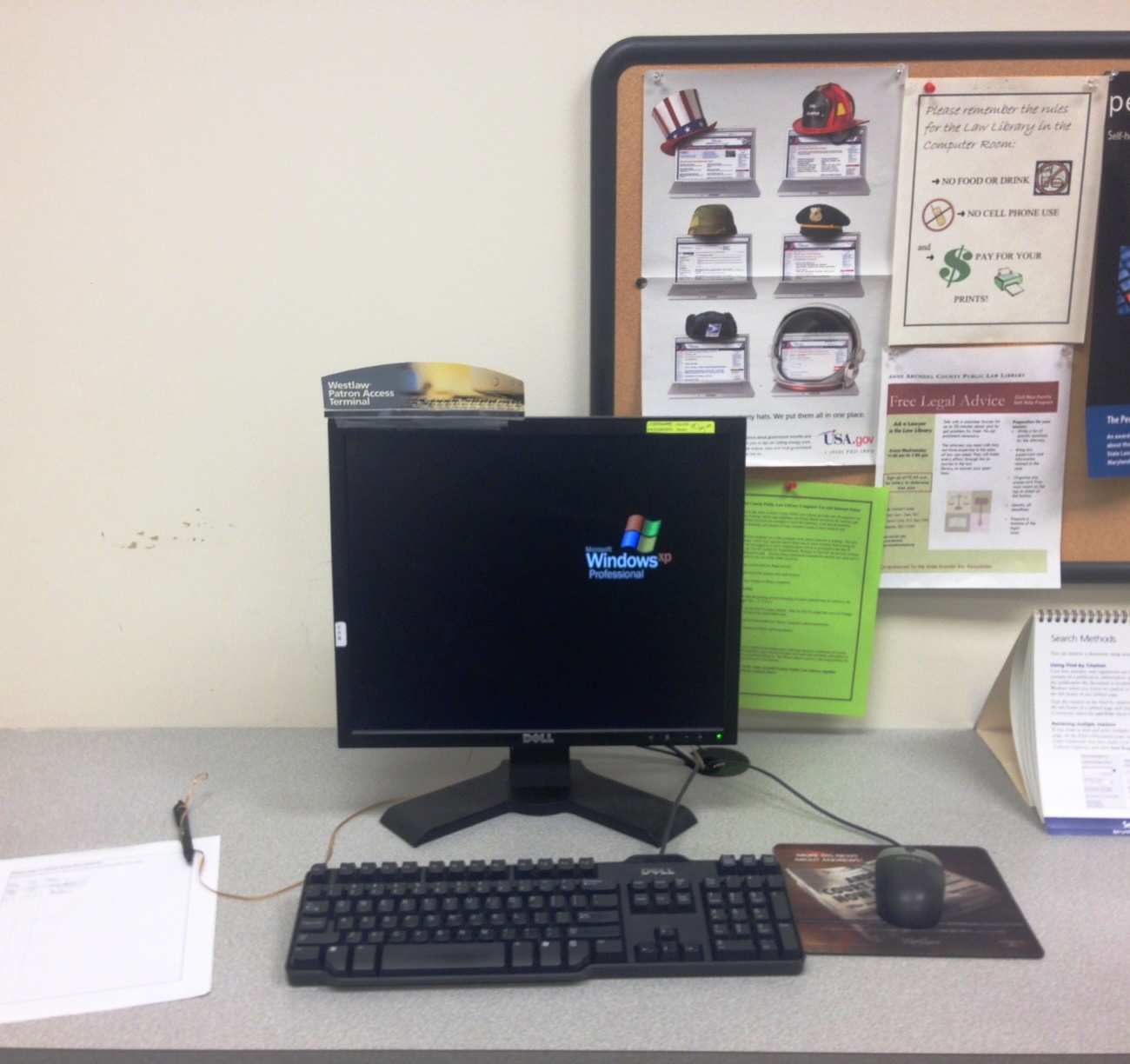
Here is one of two computers in our computer room that prioritizes Westlaw access.

Online databases can be invaluable, time-saving tools to any legal researcher as they provide organized access to a wide array of legal resources as well as sophisticated search tools. Many online databases, including fee-based databases, are available at the Law Library, free of charge, to library patrons. Each Tuesday of this month, this blog will highlight one of the many databases available at the Law Library.

Westlaw (www.westlaw.com) and Lexis (www.lexis.com) are two of the biggest players in the world of legal publishing and online legal research. These two legal services providers offer searchable databases with access to a wide array of primary resources, such as federal and state statutes, federal and state regulations and case law, as well as secondary resources, such as encyclopedias, treatises, journal articles and form books.*

There is a myriad of tools, resources and services available through both Westlaw and Lexis. One of the most popular services provided through Westlaw and Lexis is the online case citator service provided by each database (KeyCite for Westlaw and Shepard’s Case Citations for Lexis). These case citators identify all published cases and other sources that cite (e.g., refer to) the case being reviewed by the legal researcher and provide additional information, such as the reason why the later case cited the case at hand. This is important information to have as later cases can affect the value of the case at hand or later cases may better address the matter being researched. In addition, both databases provide document delivery services (e.g., email, PDF downloads, RTF downloads) so that users can access certain resources after the online session has concluded.

Access to these two databases can be very expensive, but the Law Library maintains subscriptions to both databases so that library patrons can access the databases free of charge. Law Library patrons can directly access these databases in the Law Library’s computer room. For those of you who are new to Westlaw and Lexis, the Law Library is available to assist you in learning how to use both databases and identifying the resources available through the databases. For those of you who have used Westlaw and Lexis in the past, the Law Library can assist you with searching more effectively. Please drop by the Law Library’s service desk, and we will help you get started.

 *For more information about understanding legal research, including the difference between primary and secondary legal resources, check out these research guides.

Categories
lawlibrary Legal Technology

Social Media for Lawyers – Check out these ABA Publications

large image

All of these titles can be found in the law library.  Find out how social media can be used in the practice of law.

Kimbro, Stephanie L. Virtual Law Practice: How to Deliver Legal Service Online. Chicago: ABA Law Practice Management, 2010. (KF320.A9K56 2010)

Elefant, Carolyn and Nicole Black.  Social Media for Lawyers: The Next Frontier. Chicago: ABA Law Practice Management, 2010. (KF320.A9E44 2010)

Kennedy, Dennis and Allison C. Shields. LinkedIn in One Hour for Lawyers. 2d ed. Chicago: ABA Law Practice Management, 2014. (KF320.I57K46 2014 (in process))

Svenson, Ernie. Blogging in One Hour for Lawyers. Chicago: ABA Law Practice Management, 1012. (KF320.I57S88 2012)

Kennedy, Dennis and Allison C. Shields. Facebook in One Hour for Lawyers. Chicago: ABA Law Practice Management, 2012. (KF320.K47 2012)

Elefant, Carolyn and Nicole Black.  Social Media for Lawyers: The Next Frontier. Chicago: ABA Law Practice Management, 2010. (KF320.A9E44 2010)

Correia, Jared. Twitter in One Hour for Lawyers. Chicago: ABA Law Practice Management, 2012. (in process)


Categories
Legal Technology Maryland Law

Maryland Sentencing Guidelines Calculator

In the most recent edition of  the Guidelines E-News (Vol9 No2-June 2014)  the Maryland State Commission on Criminal Sentencing Policy announced the availability of an online Sentencing Guidelines Calculator Tool.

The Maryland Automated Guidelines System (MAGS) designed by the Commission is now in use in the Montgomery County Circuit Court and the Calvert County Circuit Court.  The calculator is now available to anyone who would like to use it.

The newsletter provides detailed instructions in its use.  Access is provided on the Commission’s website through the Quick Links list on the left-hand side of the page: http://msccsp.org/


Categories
EJC2014 lawlibrary Legal Technology Pro Bono Self Represented

EJC 2014: A Law Librarian’s Report

The ABA/NLADA Equal Justice Conference has ended and I am back at work.  The EJC is a joint effort of the ABA Standing Committee on Pro Bono and Public Service and the National Legal Aid & Defender Association (NLADA). The EJC provided a great forum in which to learn from  interesting programming and from getting to know others whose work involves providing legal services to those who cannot afford legal help. I hoped to be able to report on a daily basis but found little time to fit that in.  Here are some of the highlights.

Categories
lawlibrary Legal Technology

New Maryland Rules for Electronic Filing

Issue 02, Spring, 2013 of Moving Justice Forward, the quarterly bulletin that provides information on the implementation of Maryland Electronic Courts (MDEC), reports that the rules order concerning e-filing was posted on May 2, 2013 on the Judiciary website. The 176th Report and Supplement Rules Order, filed May 1, will go into effect July 1, 2013.

The report included changes to existing rules because of e-filing and the new Title 20,  Electronic Filing and Case Management.    The new rule 20-102 states that the new Title 20 will apply only where MDEC has been established and will start with Anne Arundel County.  Issues covered include how attorneys will register, a new definition of what a “day” is, signatures, procedures for self-represented litigants and access to records. The article that begins on page 9 provides a good overview of the new Title 20.

More information can be found on the MDEC webpage and in the previous issue of Moving Justice Forward, Issue 01, Winter 2013


Categories
lawlibrary Legal Technology

ABA Offers Friday Seminars on Technology

The ABA has announced that it will be offering a series of  live webinars  on the topic of the practice of law and technology:

Future Friday Seminars: Strengthening Your Practice Through Technology

The series will begin on May 3 with  an Overview of the Future of Law.  Other topics include:  Document Assembly and AutomationThe Virtual Office, Working Remotely, and Online CollaborationThe Paperless Office and Digital WorkflowsUnderstanding Your Finances and Alternative Billing Strategies, and Building a Client-Focused Law Practice.


Categories
lawlibrary Legal Technology

Maryland District Court Self Help Center Offers Remote Access

The Maryland Judiciary’s recent press release announced that the Maryland District Court Self Help Center now offers remote access via Live Chat and  phone.  Until now, the Center’s services were limited to walk-ins only at the Glen Burnie District Court at 7500 Ritchie Highway.  It was great for us that the first and only District Court Self Help center was located in Anne Arundel County.  The law library has been making referrals to the center since it opened two years ago.  However, the location sometimes proved a problem for some of those we referred there.  Already we were able to refer a caller from Virginia to the Live Chat for assistance with a Maryland District Court case. The phone service will make it even easier.  Based on the many phone calls we get related to the district court such as landlord/tenant, debt collections ans small claims I  know that this service is needed and will be appreciated.

Online, live-chat and phone:
Phone 410-260-1392
www.mdcourts.gov/district/selfhelpcenter/home.html
Hours: 8:30 a.m.-noon, 12:30-4:30 p.m.

Walk-in:
Glen Burnie District Court
7500 Ritchie Highway, Room 206
Glen Burnie, MD 21061
Hours: 8:30 a.m.-noon, 12:30-4:30 p.m.